|
<< Click to Display Table of Contents >> Troubleshooting & Help |
  
|
|
<< Click to Display Table of Contents >> Troubleshooting & Help |
|
Most issues employees encounter when using TelMe are the result of the settings applied by their employers within PeopleHours.
As a result you should contact your line manager in the first instance for help.
The sections below may also assist you in understanding how the app works and why calls might be rejected or certain functions are unavailable.
TelMe unloading / Repeated requirement to log in
Your devices battery optimisation settings or 3rd party apps that are designed to extend battery life or free memory can prevent TelMe from running correctly in the background.
This may result in the app having logged you out when you go to use it again. You may not be alerted to calls due.
You will have to fully unload the app yourself to allow a log on request to be accepted again.
To exclude TelMe from battery optimisation
1.Open Settings on your device.
2.Select the Battery entry.
3.Touch the three-dot Menu icon in the upper-right and choose Battery Optimisation.
4.Tap the blue bar and select All apps to see everything on your device.
5.Select an app you want to exclude from battery optimization and choose Don't optimise.
 Battery optimisation 1 |
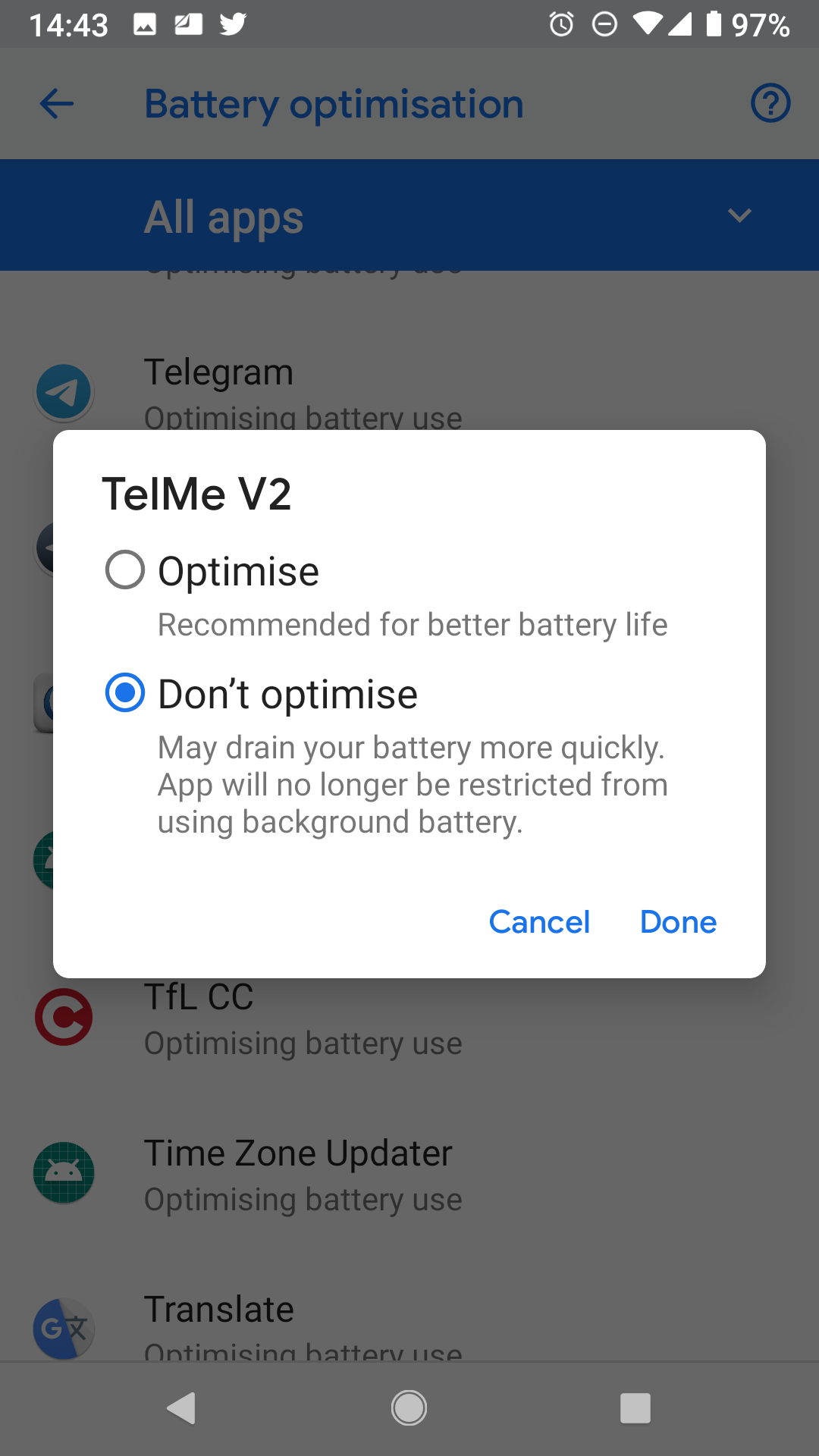 Battery optimisation 2 |
 Battery optimisation 3 |
|
 CleanSweep Ignore list |
 Security 360 Safe List |